RNA-Seq
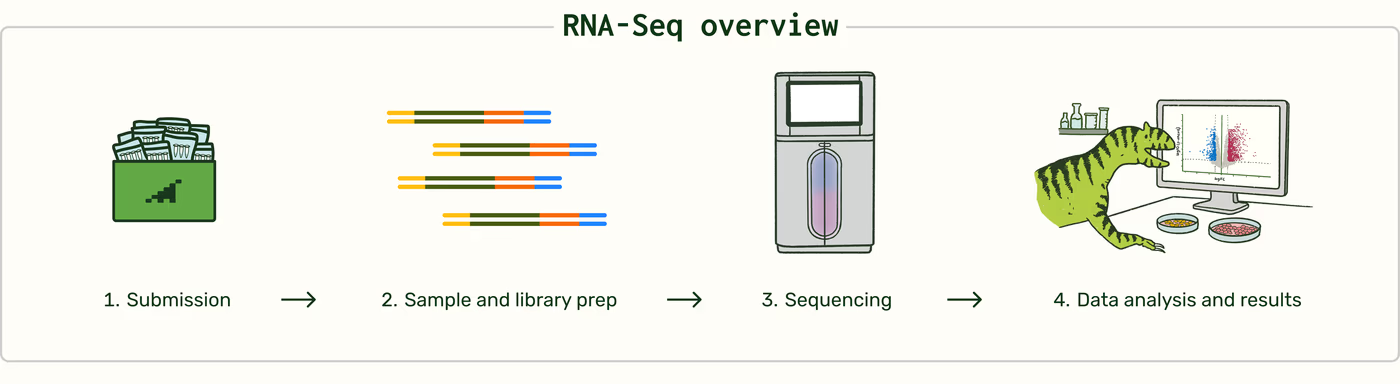
How it works
Plasmidsaurus RNA-Seq uses short-read Illumina sequencing and a 3′ end counting workflow optimized for gene-level expression analysis. It is designed to produce accurate gene-level molecule counts for gene-level differential expression analysis. It is not intended for full-length transcript reconstruction or isoform analysis.
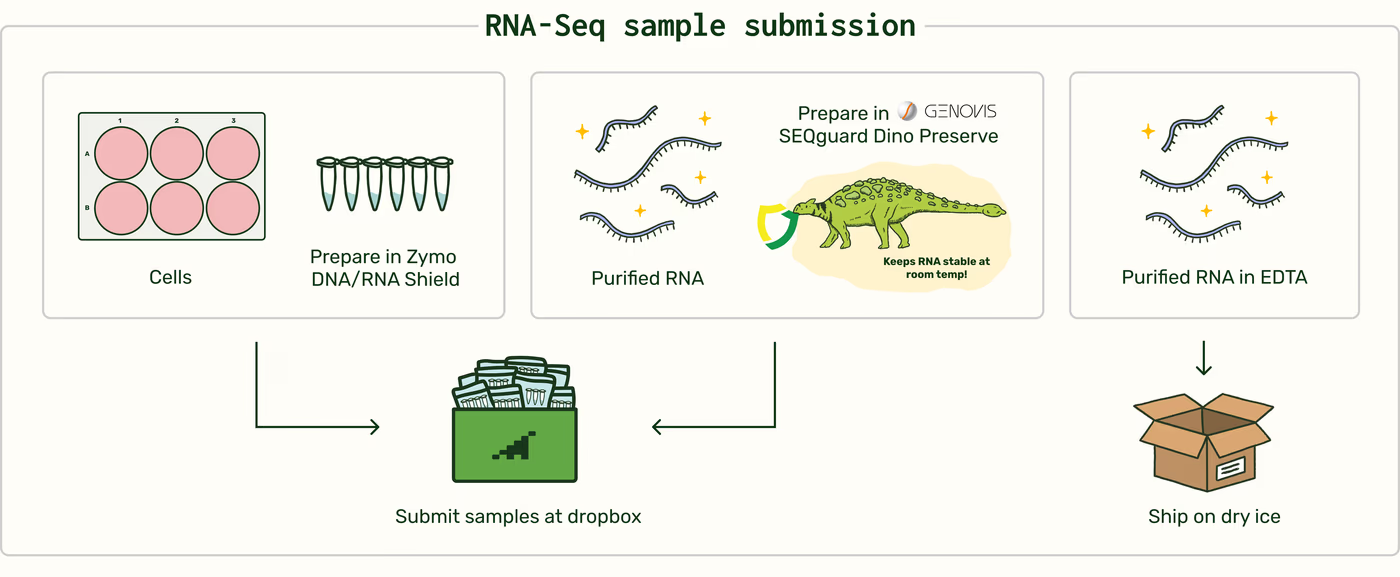
Customers may submit either cells preserved in Zymo DNA/RNA Shield or purified total RNA on dry ice or in SEQguard Dino Preserve at room temperature. Refer to the Sample Preparation Guidelines for detailed input requirements.
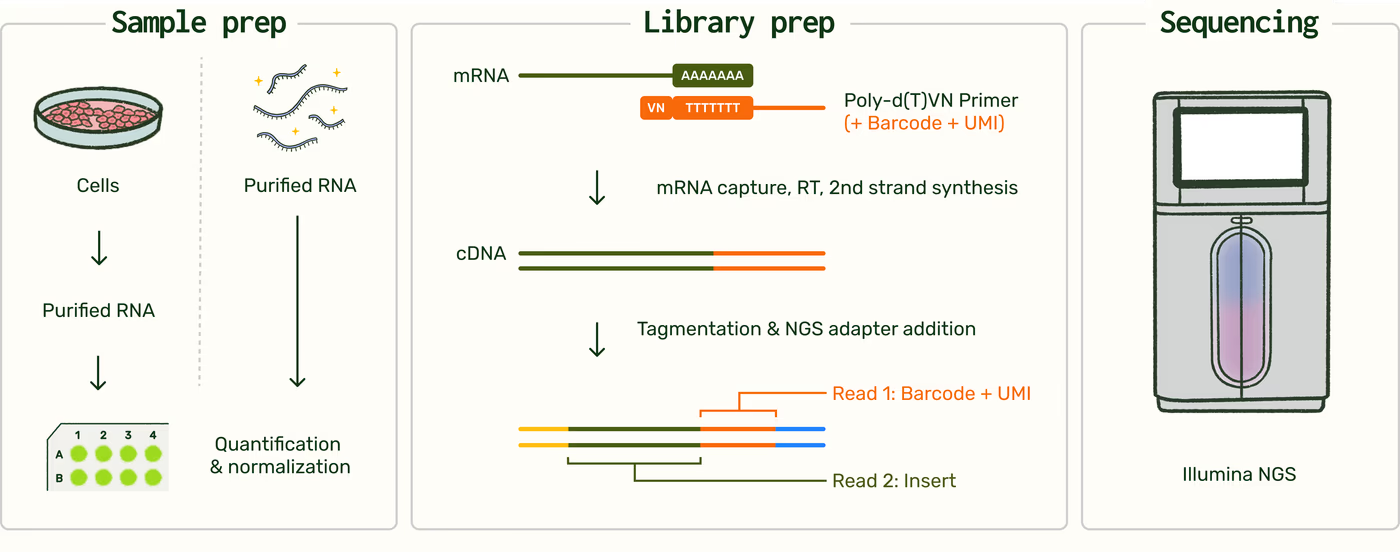
For preserved cells, total RNA is isolated using a bead-based extraction method. RNA yield and sequencing performance depend on the number of cells submitted and the integrity of the starting material.
Following extraction, or upon receipt of purified RNA, RNA concentration is measured using a fluorescence-based plate assay. Samples are then normalized before library preparation. Plasmidsaurus does not measure RNA integrity number (RIN) before library preparation or hold samples when RNA concentration is below the recommended input level. Submitting an adequate number of intact cells or sufficient high-quality purified RNA is therefore important for obtaining optimal results.
Messenger RNA is reverse-transcribed into first-strand complementary DNA (cDNA) using a poly(dT)VN primer. During this step, each RNA molecule is tagged with a molecular barcode containing a unique molecular identifier (UMI), which enables sequencing reads derived from the same original molecule to be identified and collapsed during data processing. After second-strand synthesis, the double-stranded cDNA is tagmented and amplified to prepare it for Illumina sequencing. Unique dual indices (UDIs) are incorporated during amplification to support multiplexing and demultiplexing.
Libraries are sequenced on the Illumina NovaSeq X Plus platform (catalog no. 20084804) using asymmetric paired-end sequencing. The mRNA reads are approximately 90 bases in length and are enriched near the 3′ end of captured transcripts, with most aligning within the final approximately 400 nucleotides. The library is stranded: each read matches the sense strand of the transcript it came from, so reads align to whichever genomic strand the gene is encoded on. Reads are forward-stranded for the purposes of strand-specific counting.
Bioinformatics
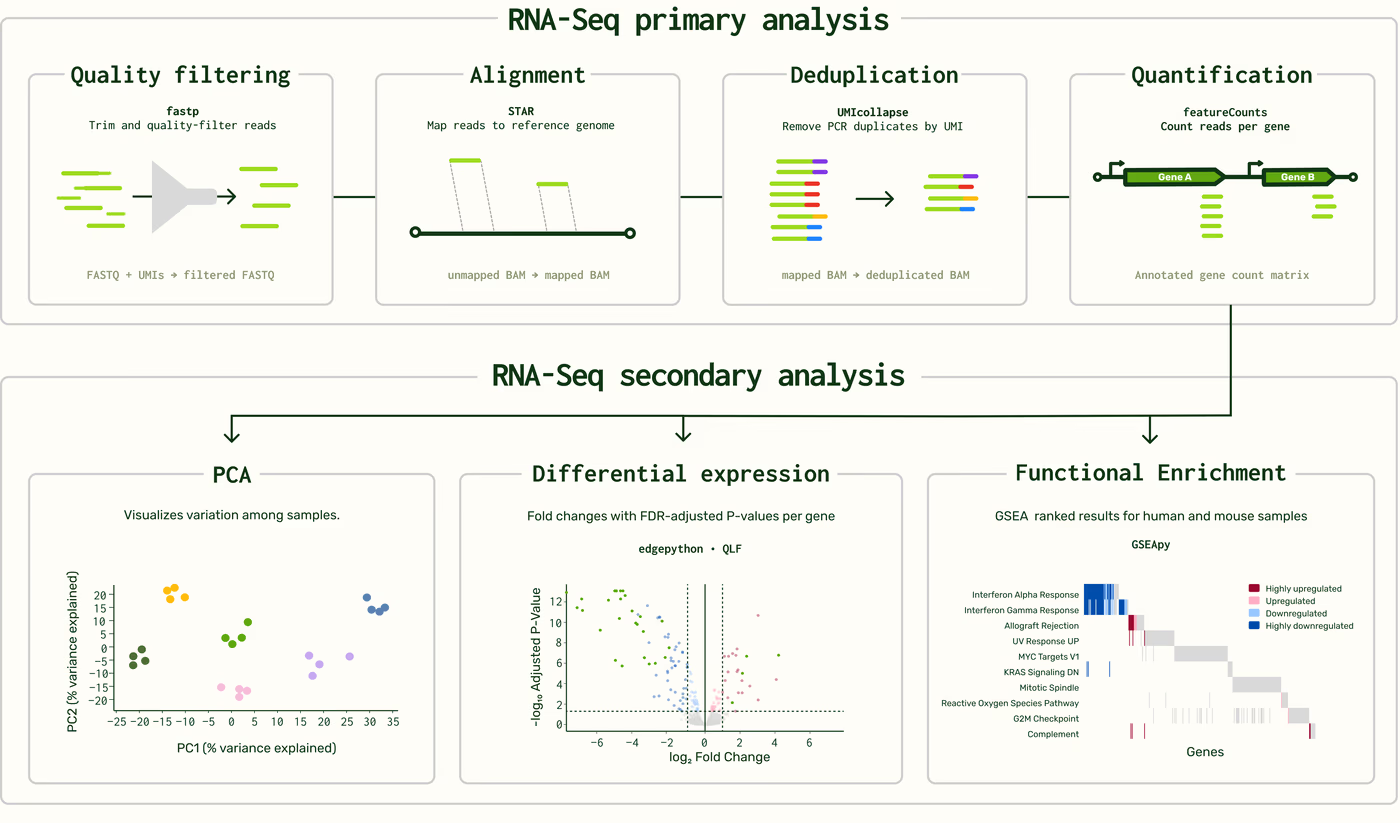
Each sample is processed through our primary RNA-Seq analysis pipeline before results are delivered. Sequencing reads are demultiplexed, quality filtered and trimmed, aligned to the selected reference genome, deduplicated using unique molecular identifiers (UMIs), and quantified at the gene level.
During primary analysis, each sample also passes through sample screens for mycoplasma contamination and, for human and mouse samples, cell line or mouse strain identity. These screens branch off the main workflow and do not affect gene counts.
The annotated gene-count matrix is used by interactive on-platform tools for secondary analysis. These tools enable you to evaluate relationships among samples using principal component analysis (PCA), perform differential gene expression analysis between user-defined sample groups, and assess differentially expressed genes for gene set enrichment.
Primary analysis
| Step and software | Description |
|---|---|
| FASTQ generation and demultiplexing BCL Convert, fqtk | Converts Illumina base call files to FASTQ format and assigns reads to samples using library indexes. |
| Quality filtering fastp | Trims poly-X tails and low-quality bases from the 3′ end. Reads must meet a minimum Phred quality score of 15 and a minimum length of 50 bp after filtering. |
| Alignment STAR | Aligns reads to the selected reference genome. Noncanonical splice junctions are removed, and unmapped reads are retained in the output. |
| BAM sorting samtools | Sorts aligned BAM files by genomic coordinate. |
| Deduplication UMICollapse | Collapses reads sharing a unique molecular identifier at the same alignment position so that each original RNA molecule is counted once. |
| Mapping quality control RustQC | Calculates alignment metrics, strand specificity, and read distribution across genomic features. |
| Aggregate quality-control reporting MultiQC | Consolidates sample-level quality-control metrics into a single report. |
| Gene quantification featureCounts (Subread) | Performs strand-specific counting with fractional assignment of multimapping reads. Reads overlapping exons and 3′ UTR features are assigned and grouped by gene_id. Count tables are annotated with gene biotype and other metadata from the reference GTF file. |
Sample screens
| Step and software | Description |
|---|---|
| Cell line and mouse strain identification (Human and mouse only) | Genotypes a panel of SNP sites from aligned reads (235 for human, 600 for mouse) and compares each sample against reference profiles for 917 human cell lines or 45 mouse strain groups. Human samples are also checked for a second cell line making up 10% or more of reads. Supported for human and mouse samples only. See the cell line and mouse strain identification technical note. |
| Mycoplasma screen (Optional feature enabled in Account > Settings) | Aligns reads that did not map to the host reference against curated genomes for nine mycoplasma and related species. After filtering for alignment identity and quality, it counts confidently aligned reads per species and applies a dynamic threshold set above the background observed in uninfected samples. See the mycoplasma detection screen technical note. |
Secondary analysis
| Analysis and method | Description |
|---|---|
| Normalization Trimmed mean of M-values (TMM) | Normalizes gene counts to account for differences in library size and composition between samples. |
| Sample correlation Pearson correlation | Calculates pairwise sample correlations from normalized counts, with hierarchical clustering, for the sample correlation heatmap. |
| Principal component analysis | Uses normalized gene counts to evaluate the major sources of variation among samples. |
| Differential expression edgePython | Reports gene-level expression differences between defined sample groups, using a negative binomial model with a quasi-likelihood F-test. P values are adjusted across all tested genes by the Benjamini–Hochberg method (FDR). Comparisons with one sample per group report fold change only. |
| Functional enrichment GSEApy | Performs gene set enrichment analysis using the MSigDB Hallmark gene sets. Supported for human and mouse samples only. |
| Batch correction (optional) Method based on RUVSeq | Anchor-based correction estimating technical variation between samples processed in separate batches. See the RNA-Seq anchor-based batch correction technical note. |
| Gene panel qPCR-style view | Displays differential expression results for selected genes or gene sets as log₂ fold change, fold change, or ΔΔCq, with 95% confidence intervals. Uses the same results as differential expression; no additional test is run. |
Data and Deliverables
Filename key
ORDERCODEUnique order identifier, such as
JPY6QT.OSIDOrder-sample identifier, such as
JPY6QT_1, used to trace files back to a specific tube.SAMPLECustomer-provided sample name, such as
Control_rep_1. Used with the OSID in filenames like<OSID>_<SAMPLE>.
Download Results button <ORDERCODE>_results.zip
Results generated from automated data analysis pipeline.
| File or deliverable | Description |
|---|---|
<ORDERCODE>_mapping-stats/<OSID>.tsv <ORDERCODE>_mapping-stats/<OSID>_<SAMPLE>.tsv | Per sample statistics on number of reads: mapped, unmapped, and deduplicated. |
<ORDERCODE>_per-sample-multiqc-report/<OSID>.html <ORDERCODE>_per-sample-multiqc-report/<OSID>_<SAMPLE>.html | Per sample statistics on the quality of reads sequenced and mapped. |
<ORDERCODE>-correlation-heatmap.png | Pairwise Pearson correlation coefficients with hierarchical clustering. Also exportable as .png or .svg online. |
<ORDERCODE>-expression-matrix.tsv | Gene count matrix for all the samples in the order, including both total counts and CPM (counts per million). |
<ORDERCODE>-gene-biotype-5plus_reads-summary.csv | Barplot of genes detected by biotype, only including genes with at least 5 reads. |
<ORDERCODE>-gene-biotype-5plus_reads.html | Number of genes detected by biotype, only including genes with at least 5 reads. |
<ORDERCODE>-mapping-stats-reads.csv | Order-level statistics on number of reads: mapped, unmapped, and deduplicated. |
<ORDERCODE>-methods.txt | Description of the bioinformatics methods used to filter, align, and process the raw reads. |
<ORDERCODE>-multiqc-report.html | Order-level statistics on the quality of reads sequenced and mapped. |
<ORDERCODE>-pca-scatter.html | Principal Component Analysis uses normalized gene counts to evaluate major sources of variation among samples. Also exportable as .png or .svg online. |
FASTQ button <ORDERCODE>_fastq.zip
| File or deliverable | Description |
|---|---|
<OSID>_<SAMPLE>.fastq.gz | Adapter-trimmed and length-filtered reads, demultiplexed and forward-stranded. Poly(A) sequences are retained, reads are not UMI-deduplicated, and each UMI is carried in the read header. |
BAM button <ORDERCODE>.bam.zip
| File or deliverable | Description |
|---|---|
<OSID>_<SAMPLE>_dedup-mapped-reads.bam.csi <OSID>_<SAMPLE>_dedup-mapped-reads.bam <OSID>_<SAMPLE>_unmapped-reads.bam | UMI-deduplicated reads aligned to reference in bam.zip folder. |
Online Results Page
Primary analysis
| File or deliverable | Description |
|---|---|
| Sample Review table | Sample: Sample name as submitted. # Reads: Total reads sequenced for the sample. # Unique Reads: Deduplicated mapped reads. RNA Concentration (ng/µL): Concentration measured by fluorescence-based plate assay before library preparation. Strain: Cell line or mouse strain identification result. Human samples are reported as cell line identified, mixture, not a cell line, or unknown. Mouse samples are reported as strain group identified, non-inbred, or unknown. Human and mouse samples only. Contaminants: Mycoplasma screen result. Reported only when two or more samples in an order test positive. Reporting is on by default for academic accounts and can be toggled under Account Settings > Features. |
Interactive gene expression profile plots gene-expression-<ORDERCODE>.png gene-expression-<ORDERCODE>.svg gene-expression-raw_<ORDERCODE>.csv | Heatmap or bar plots of gene expression compared across samples. Export figure as .png, .svg. Export all, or selected data as .csv. |
Secondary analysis
| File or deliverable | Description |
|---|---|
Interactive volcano or MA plots dge-volcano-plot-<ORDERCODE>.png dge-volcano-plot-<ORDERCODE>.svg dge-ma-plot-<ORDERCODE>.png dge-ma-plot-<ORDERCODE>.svg | Plot showing up- and down-regulated genes between two conditions. Export figure as .png or .svg. |
Differentially Expressed Genes table <ORDERCODE>_<SAMPLE>_dge.csv | DEG data used to create the volcano or MA plots. Option to select all genes, currently selected genes, or genes that match filtered results. |
Interactive Functional Enrichment heatmap and dotplot functional_enrichment.png | Heatmap or dotplot showing pathways identified with gene set enrichment analysis (GSEA) using the Hallmark gene set. |
Enriched Pathways table <Pathway Library>_gsea_functional_enrichment.csv | Results of functional enrichment analysis, showing enriched pathways and their statistical significance. |
Interactive gene panels <ORDERCODE>_gene_panels.png <ORDERCODE>_gene_panels.csv | Fold change and 95% confidence interval for selected genes and gene sets, with up to four conditions per baseline. The PNG exports the current page of up to 50 rows; the CSV exports every selected gene and comparison. |
Technical notes and related guides
- Technical Note: RNA-Seq anchor-based batch correction
- Anchor-based batch correction (beta) adjusts for technical variation introduced when samples are processed in separate batches, so expression values can be compared across batches.
- Technical Note: Mycoplasma detection screen in Plasmidsaurus RNA-Seq data
- How mycoplasma contamination is detected from sequencing reads and how to interpret the result.
- Technical Note: Cell line and mouse strain identification in Plasmidsaurus RNA-Seq
- Cell line and mouse strain identification compares SNPs captured in RNA-Seq reads against reference genotypes to confirm the identity of human cell lines and mouse strain backgrounds.
- Cell line and mouse strain identification compares SNPs captured in RNA-Seq reads against reference genotypes to confirm the identity of human cell lines and mouse strain backgrounds.
Performance and troubleshooting
Samples that meet input requirements typically yield 10 million or more unique, deduplicated reads. Read count is not guaranteed and varies with sample input and RNA quality.
Deduplication is performed after alignment, so only reads that map to the selected reference genome are collapsed and counted. The reported unique, deduplicated read count therefore reflects mapped reads rather than total sequencing output. For samples with a low mapping rate, this count can be substantially lower than the number of reads generated, and a low value alone does not distinguish insufficient sequencing depth from poor alignment. Per-sample mapping statistics reporting mapped, unmapped, and deduplicated read counts are provided with your results.
Reruns
If a processing deviation occurs, Plasmidsaurus may rerun the sample when sufficient material is available. Submitting additional volume can help support repeat processing.
For questions about sequencing results or rerun eligibility, contact support@plasmidsaurus.com.
PS-0006-E | v1.3 | Revised Oct. 14, 2026